
Thursday, January 6, 2011
Download Mac OS X 10.6.6 — Mac App Store Finally Opens !
Apple has just released Mac OS X 10.6.6 accompanied with access to the Mac App Store in Software Update. The Mac App Store already includes some apps officially from Apple as iLife ’11 suite with standalone apps sold at $15 each.
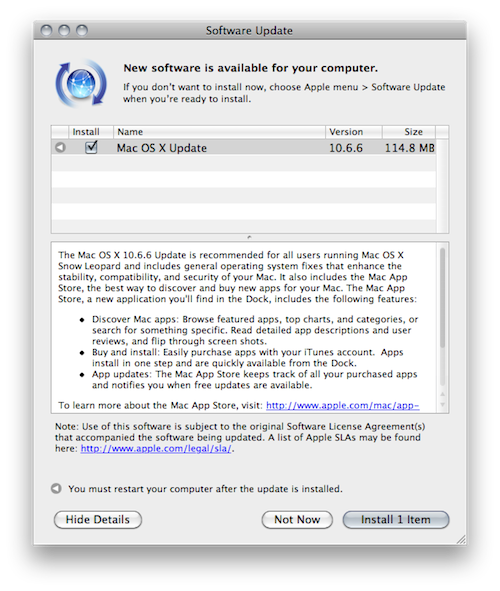
The Mac OS X 10.6.6 Update is recommended for all users running Mac OS X Snow Leopard and includes general operating system fixes that enhance the stability, compatibility, and security of your Mac. It also includes the Mac App Store, the best way to discover and buy new apps for your Mac. The Mac App Store, a new application you’ll find in the Dock, includes the following features:Mac App Store comes with more than thousand apps for launch including Twitter for Mac and more. To be able to get it, just download the new Mac OS X 10.6.6 and have fun. Full press release of the Mac App Store is as follows:
Discover Mac apps: Browse featured apps, top charts, and categories, or search for something specific. Read detailed app descriptions and user reviews, and flip through screen shots.
Buy and install: Easily purchase apps with your iTunes account. Apps install in one step and are quickly available from the Dock.
App updates: The Mac App Store keeps track of all your purchased apps and notifies you when free updates are available.

APPLE’S MAC APP STORE OPENS FOR BUSINESSDownload Mac OS X 10.6.6 Snow Leopard (Combo)
CUPERTINO, California—January 6, 2011—Apple® today announced that the Mac® App Store℠ is now open for business with more than 1,000 free and paid apps. The Mac App Store brings the revolutionary App Store experience to the Mac, so you can find great new apps, buy them using your iTunes® account, download and install them in just one step. The Mac App Store is available for Snow Leopard® users through Software Update as part of Mac OS® X v10.6.6.
“With more than 1,000 apps, the Mac App Store is off to a great start,” said Steve Jobs, Apple’s CEO. “We think users are going to love this innovative new way to discover and buy their favorite apps.”
The Mac App Store offers apps in Education, Games, Graphics & Design, Lifestyle, Productivity, Utilities and other categories. Users can browse new and noteworthy apps, find out what’s hot, see staff favorites, search categories and look up top charts for paid and free apps, as well as user ratings and reviews.
Entirely new apps, as well as current Mac favorites, are available from developers such as Autodesk, Ancestry.com and Boinx. iPhoto®, iMovie® and GarageBand® apps from Apple’s popular iLife® ‘11 suite are available individually in the Mac App Store for $14.99 each, and Pages®, Keynote® and Numbers® apps from iWork® are available for $19.99 each. Aperture® 3, Apple’s powerful photo editing and management software, is available for $79.99.
“We’re delighted to bring our professional-grade paint and drawing app, Autodesk SketchBook Pro, to the Mac App Store on its first day of launch,” said Carl Bass, Autodesk’s CEO. “We’ve seen tremendous success on the Mac, iPhone and iPad with multiple apps. We’re excited to offer SketchBook Pro on the Mac App Store so artists can easily create everything from quick sketches to high-quality artwork right on their Macs.”
“By offering the Ancestry.com Family Tree Maker app on the Mac App Store, we’re making it even easier for people to discover and access their family history,” said Tim Sullivan, Ancestry.com’s CEO. “The Mac App Store will drive a new generation of innovation on the Mac platform.”
“We’re thrilled to have our award-winning animation, video production and photography software available on the new Mac App Store,” said Oliver Breidenbach, Boinx Software’s CEO. “The Mac App Store makes it easier than ever for consumers to access all the innovative software designed for the Mac.”
To get the Mac App Store, download the Mac OS X v10.6.6 Software Update or visit www.apple.com/mac/app-store. To find out more about developing for the Mac App Store visit developer.apple.com/programs/mac.
Apple designs Macs, the best personal computers in the world, along with OS X, iLife, iWork, and professional software. Apple leads the digital music revolution with its iPods and iTunes online store. Apple is reinventing the mobile phone with its revolutionary iPhone and App Store, and has recently introduced its magical iPad which is defining the future of mobile media and computing devices.
3:33 PM 1
Sunday, December 26, 2010
Jailbreak 4.2.1 Untethered with Redsn0w 0.9.7b3 iPhone 4, 3GS, iPod touch 4G, 3G [How to Guide]
These are instructions on how to untether your jailbreak of iOS 4.2.1 using the iPhone Dev-Team's 'backup plan' method on Mac OS X.
Currently this very first beta1 is limited to iPhone4, iPad, and iPod touch 4G. Bluetooth functionality is disabled for the time being until some issues are resolved.
Requirements:
You will need to have access to the iOS 4.2b3 ipsw and your iOS 4.2b3 SHSH blobs saved. You also already need to be jailbroken on iOS 4.2.1. MAKE SURE YOU BACKUP BEFORE ATTEMPTING THIS AS IT IS A BETA!
Step One
Create a folder called Pwnage on your desktop and in it place:
- Xcode (also found on your Mac OS X Install DVD)
- MacPorts
- Usbmuxd
- RedSn0w 0.9.7b
- iOS 4.2.1 (iPhone, iPad, iPod touch)
- iOS 4.2b3 *Only iPhone developers have legit access to this firmware
Step Two
Double click the Xcode dmg to mount it then double click the pkg to install the application.
Step Three
Double click the MacPorts dmg to mount it then double click the pkg to install the application.
Step Four
Open Terminal from Applications:Utilities then input the following. If asked for a password then enter your administrator password.
sudo ports install libusb
Once libusb has installed then input the following command: sudo ports install cmake
Once cmake has finished installing input the following command: sudo ports install pkgconfig
Step Five
Double click the downloaded usbmuxd archive to extract it.
Return to the Terminal window and input the following commands to install usbmuxd: cd ~/Desktop/Pwnage/usbmuxd-1.0.6
mkdir build
cd build
cmake ..
make
sudo make install
Step Six
Disconnect and then reconnect your jailbroken iPhone to the computer via USB. Make sure OpenSSH is installed through Cydia then input the following into the Terminal window:
cd ~/Desktop/Pwnage/usbmuxd-1.0.6/python-client/
chmod +x tcprelay.py
./tcprelay.py -t 22:2222
*Make sure to leave this running as you continue the tutorial...
Step Seven
Double click the RedSn0w archive to extract it. Then launch RedSn0w from the extracted folder.
Click the Browse button
Select the iOS 4.2.1 ipsw from the Pwnage folder on your Desktop and click Open.
Click the Next button to continue.
RedSn0w will now prepare the jailbreak data.
You will now be presented with a list of checkboxes.
Select Jailbreak Monte (untether) from the list of checkboxes. You will be asked to select the iOS 4.2b3 ipsw from the Pwnage folder on your desktop then click Open. Click Next to continue.
Please plug your iPhone into the computer and make sure its OFF then click the Next button
RedSn0w will now guide you through the steps to get into DFU mode. You can find more help with DFU mode here
Hold down both the Home button and the Power button for 10 seconds.
Release the Power button and continue holding the Home button until RedSn0w detects the device.
RedSn0w will prepare Jailbreak Monte files, exploit with Limera1n, Upload RAM Disk and Kernel, and Send Jailbreak Monte files.
Notice that during this time usbmuxd will facilitate the connection to your device.
RedSn0w will inform you when it has completed successfully.
Download Redsn0w 0.9.7b3 for Mac OS X
Download iOS 4.2.1 for iPhone, iPad and iPod touch
Download iTunes 10.1.1 for Windows / Mac OS X


2:59 AM 17
Wednesday, December 15, 2010
Download iTunes 10.1.1 Update For [Windows & Mac]
A few minutes ago Apple has just released iTunes 10.1.1 for Windows and Mac, this update of iTunes fixing Alot of bugs while syncing music and videos, as usual I advice for who has a jailbroken device to stay away from using this new version till we get the word from the Dev-team.

This release provides a number of important bug fixes, including:
Download iTunes 10.1.1 for Windows and Mac
- Addresses an issue where some music videos may not play on Macs equipped with NVIDIA GeForce 9400 or 9600 graphics.
- Resolves an issue where iTunes may unexpectedly quit when deleting a playlist that has the iTunes Sidebar showing.
- Fixes a problem where iTunes may unexpectedly quit when connecting an iPod to a Mac equipped with a PowerPC processor.
- Addresses an issue where some music videos may not sync to an iPod, iPhone, or iPad.
12:39 PM 0
Thursday, November 11, 2010
Mac OS X 10.6.5 Released [Download]
Apple has just released the long waited Mac OS X 10.6.5 Snow Leopard. You can finally get it now from your software update. Here's the full change log below:

What’s included?Download Mac OS X 10.6.5 Snow Leopard [Direct Link]
General fixes and improvements
- Improves reliability with Microsoft Exchange servers.
- Addresses performance of some image-processing operations in iPhoto and Aperture.
- Addresses stability and performance of graphics applications and games.
- Resolves a delay between print jobs.
- Addresses a printing issue for some HP printers connected to an AirPort Extreme.
- Resolves an issue when dragging contacts from Address Book to iCal.
- Addresses an issue in which dragging an item from a stack causes the Dock to not automatically hide.
- Resolves an issue in which Wikipedia information may not display correctly in Dictionary.
- Improves performance of MainStage on certain Macs.
- Resolves spacing issues with OpenType fonts.
- Improves reliability with some Bluetooth braille displays.
- Resolves a VoiceOver issue when browsing some websites with Safari 5.
- Improves Bluetooth pairing with Magic Trackpad.
- Resolves performance issues with third-party displays that use InstaPort technology.
- Add SSL support for transferring files with iDisk.
- Resolves an issue when opening 4-up Photo Booth pictures in Preview.
- Addresses keyboard responsiveness issues in the Dock when Spaces is turned on.
- Resolves an issue syncing Address Book with Google.
- Fixes an issue when replying to a Mail message sent by a person whose name contains certain characters such as é or ü.
- Improves performance for users bound to an Active Directory domain.
- Improves reliability of Ethernet connections.
- Systems with a Mac Pro RAID Card (Early 2009) installed can now be put to sleep. For more information, see Mac Pro RAID Card (Early 2009): Enabling system sleep.
- Improves reliability of fibre channel connections, resolving a potential Xsan volume availability issue.
- Adds RAW image compatibility for additional digital cameras.
- Security improvements; for information about the security content of this update, please visit this article.
- Additional Information
- This update also includes the improvements found in the Mac OS X v10.6.1, 10.6.2, 10.6.3, and 10.6.4 updates.
5:51 AM 0
Friday, November 5, 2010
Skype 5 Beta for Mac Available for Download !!
Skype 5 Beta for Mac has been released and it comes with lot of improvements, new features and totally new UI. It looks like Mac version of Skype has started gaining feature parity with Windows version.

- New call control bar — Hang up, mute and more from a mini Skype toolbar that sits on top of any web pages, documents or photos you’ve got open
- group video calling which allows you to make video calls with more than two people at a time as long as all participants are on the new Mac beta or Skype for Windows 5.0.
- Search chat content to easily navigate past conversations
- Offline IM so that you can send and receive instant messages even if the recipient is offline
- Personalise contacts via user profiles
- Quickly rejoin calls if your Internet connection fails momentarily
- Floating Contacts Monitor to see your online contacts and contact groups
Here you can try the beta version of Skype 5 for Mac OS X for free! Stay tuned as we'll inform you whenever Skype 5 goes alpha.
Download Skype 5 Beta for Mac
1:23 PM 0
Wednesday, October 27, 2010
Microsoft Office 2011 for Mac [ Download Now ]
Finally, the much waited app for Mac OS X is available for download. Earlier today, Microsoft has announced retail availability of Office 2011 for Mac. It comes in two flavors, Microsoft Office for Mac Home and Student 2011 which Costs: $109 for a single license, $129 for 3 and Microsoft Office for Mac Home and Business 2011 which Costs: $174 for a single license, $239 for 3.

Microsoft launches Office 2011 for Mac today, bringing Mac users the latest versions of the company’s productivity software. The release is the latest effort from the Office for Mac team, which has been delivering Microsoft software to the Mac for 13 years.Office 2011 for Mac brings tons of new features, Mashable has great coverage and review for the all new Microsoft Office 2011 for Mac OS X. [Microsoft]
3:07 AM 0
Tuesday, October 26, 2010
MacBook Air Blowing Up with Dynamite [Video]
9:13 AM 1
Saturday, October 23, 2010
Jailbreak iOS 4.1 on All Devices with PwnageTool 4.1 [How to Guide]
PwnageTool 4.1 for Mac OS X is available for download; and now here we are back with full step by step guide to jailbreak iPhone 4, 3GS, 3G, iPod touch 4G, 3G on iOS 4.1 and iPad on iOS 3.2.2 using the new version of PwnageTool for Mac; hit the jump for guide.
STEP 1: Download & install the latest version of iTunes & make sure your device is not on iOS 4.1 (links at the bottom).
STEP 2: Start iTunes, connect your device to your computer via USB and sync your iPhone then back your data.
STEP 3: Start PwnageTool and select your devices (iPhone 4 used in this guide).

STEP 5: On seeing this message, hit "No" to preserve your baseband to be able to unlock.
STEP 6: PwnageTool will start creating the custom pre-jailbroken firmware for your device.


Download iTunes 10 for Windows & Mac
Download iOS 4.1 for iPhone, iPod touch & iPad
Download PwnageTool 4.1 for Mac OS X
5:15 AM 0
Two New MacBooks to Hit the Shelves at “Back to the Mac” Media Event
There's nothing like an Apple media event to set the tech-rumor to float. You should know that Apple is holding “Back to the Mac” media event this Wednesday on October 20th. So, let the rumors start about what's going to be launched in this event.

So keep your eyes opened on Cupertino this week for yet another big Apple announcement, we will be covering the event.
3:21 AM 0
Wednesday, October 20, 2010
Jailbreak iPod touch 2G (MC & Non-MC Model) on iOS 4.1 with GreenPois0n [Mac & Windows Guides]
We broke the news with announcing the support of GreenPois0n jailbreak for iPod touch 2G (MC and Non-MC Model) on iOS 4.1. GreenPois0n has been updated to RC4, GreenPois0n is available for Windows, Mac and Linux operating systems, to jailbreak iPhone 4/3G, iPod touch 4G/3G on iOS 4.1 and iPad on iOS 3.2.2

- Jailbreak Guide for Windows posted here.
- Jailbreak Guide for Mac posted here.
Download iOS 4.1 fro iPod 2G (MC and Non-MC Model)
Download GreenPois0n for Mac OS X
Download GreenPois0n for Windows
3:22 AM 0
Monday, October 18, 2010
Jailbreak iPhone 4, 3GS, iPod touch 4G, 3G on iOS 4.1 with Greenpois0n on Mac OS X [How to Guide]
Chronic Dev has just released the Mac OS X version of Greenpois0n to jailbreak iOS 4.1 on iPhone 4, iPhone 3GS, iPod touch 4G/3G and iOS 3.2.2 on iPad. Now I have just prepared the step by step Mac guide to jailbreak iOS 4.1 on iPhone 4/3G and iPod touch 4G/3G with Greenpois0n.
STEP 1: Download Greenpois0n jailbreak (link at the end)
STEP 2: Connect your iPhone/iPod to your computer via USB then launch Greenpois0n jailbreak application and hit "Jailbreak" button.

- Now you have to press and hold the sleep button for 3 seconds.

- Continue holding sleep, then press and hold home for 10 seconds.

- Now release sleep button but keep holding home for 15 seconds.


STEP 7: Now press "Cydia", then "Install Cydia". After finishing you will be asked to remove Loader from your device, click "Remove", then press Home button, the device will restart automatically.


STEP 8: After your device restart you will find the Cydia icon, Congratulations.

Note: Since there is no way to unlock 05.14.02 / 2.10.04 basebands, you should upgrade to iOS 4.1 with preserving your baseband before using Greenpois0n jailbreak by following our guide (for iPhone 4 ONLY) posted here.
Download iOS 4.1 for iPhone 4/3GS.
Download Greenpois0n jailbreak for iOS 4.1.
4:21 AM 0


