
Thursday, February 10, 2011
Jailbreak iOS 4.1 iPhone, iPod, iPad [Windows/Mac/Linux][How To]

Update : Added Sn0wbreeze and Custom iOS 4.1 Firmwares at the end
Here are the different guides to jailbreak your iDevice running iOS 4.1 :
MAC - Pwnage Tool
- AppleTV 2G
- iPad (firmware 3.2.2)
- iPod touch 4G
- iPod touch 3G
- iPhone4
- iPhone 3GS
- iPhone 3G
WINDOWS / MAC / LINUX - Greenpois0n
- iPhone 4
- iPhone 3GS
- iPhone 3G (soon with RC5 release)
- iPod touch 2G
- iPod touch 3G
- iPod touch 4G
- iPad (firmware 3.2.2)
WINDOWS / MAC - limera1n
- AppleTV 2G
- iPad (firmware 3.2.2)
- iPod touch 4G
- iPod touch 3G
- iPhone4
- iPhone 3GS
WINDOWS - Redsn0w 0.9.6
- iPhone 3G
- iPod touch 2G
WINDOWS - Sn0wbreeze 2.1
- iPhone 3G
- iPhone 3Gs
- iPhone 4
- iPod Touch 2G
- iPod Touch 3G
- iPod Touch 4G
- iPad (both models)
- Apple TV 2G
2:06 PM 0
Custom Firmwares for iOS 4.1 Jailbroken for all iDevice
Below are various different custom firmware files that were created using Pwnage Tool 4.1 download these if you are weary of creating your own. Your device MUST be in pwned-DFU mode for these firmware files to restore properly(read below). Make sure you read the description of each firmware CAREFULLY so that you know what you are installing.

*IMPORTANT* In order to restore these custom firmware files, you must use Pwnage Tool(Mac) to enter DFU mode. If you have Windows, you can now use Redsn0w 0.9.6b2 to enter pwned-dfu mode which will allow you to install the custom firmware files. You must use one of these methods in order for the restore to work or you will get iTunes errors.
iPhone 4 Custom 4.1 Firmware
1. iPhone 4 4.1 UNACTIVATED- Works for iPhone 4
- Not Activated
- 1000 MB Root Partition
- Packages Installed
-Cydia
-OpenSSH
Part 1
Part 2
Part 3
2. iPhone 4 4.1 ACTIVATED
- Works for iPhone 4
- Activated
- 1000 MB Root Partition
- Packages Installed
-Cydia
-OpenSSH
– After restoring with this firmware you will need to add the repo http://repo666.ultrasn0w.com and install ultrasn0w to unlock your device
Part 1
Part 2
Part 3
iPhone 3Gs Custom 4.1 Firmware
1. iPhone 3Gs 4.1 UNACTIVATED- Works for iPhone 3Gs
- Not Activated
- 1000 MB Root Partition
- Packages Installed
- Cydia
- OpenSSH
Part 1
Part 2
2. iPhone 3Gs 4.1 ACTIVATED
- Works for iPhone 3Gs
- Not Activated
- 1000 MB Root Partition
- Packages Installed
- Cydia
- OpenSSH
Part 1
Part 2
iPhone 3G Custom 4.1 Firmware
1. iPhone 3G 4.1 UNACTIVATED/Nothing Enabled- Works for iPhone 3G
- Not Activated
- NOTHING ENABLED: Multitasking, Homescreen Wallpaper, Battery Percentage Indicator
- 800 MB Root Partition
- Packages Installed
- Cydia
- OpenSSH
- Custom Boot & Restore Logos
– This version DOES NOT come with Multitasking, Homescreen Wallpaper, Battery Percentage Indicator ENABLED. You can still enable it manually if you would like using other methods.
Part 1
Part 2
2. iPhone 3G 4.1 UNACTIVATED/Everything Enabled
- Works for iPhone 3G
- Not Activated
- EVERYTHING ENABLED: Multitasking, Homescreen Wallpaper, Battery Percentage Indicator
- 800 MB Root Partition
- Packages Installed
- Cydia
- OpenSSH
- Custom Boot & Restore Logos
– This version comes with Multitasking, Homescreen Wallpaper, Battery Percentage Indicator ENABLED.
Part 1
Part 2
3. iPhone 3G 4.1 ACTIVATED/Nothing Enabled
- Works for iPhone 3G
- Activated
- NOTHING ENABLED: Multitasking, Homescreen Wallpaper, Battery Percentage Indicator
- 800 MB Root Partition
- Packages Installed
- Cydia
- OpenSSH
- Custom Boot & Restore Logos
– After restoring with this firmware you will need to add the repo http://repo666.ultrasn0w.com and install ultrasn0w to unlock your device
– This version DOES NOT come with Multitasking, Homescreen Wallpaper, Battery Percentage Indicator ENABLED. You can still enable it manually if you would like using other methods.
Part 1
Part 2
4. iPhone 3G 4.1 ACTIVATED/Everything Enabled
- Works for iPhone 3G
- Activated
- EVERYTHING ENABLED: Multitasking, Homescreen Wallpaper, Battery Percentage Indicator
- 800 MB Root Partition
- Packages Installed
- Cydia
- OpenSSH
- Custom Boot & Restore Logos
– After restoring with this firmware you will need to add the repo http://repo666.ultrasn0w.com and install ultrasn0w to unlock your device
– This version comes with Multitasking, Homescreen Wallpaper, Battery Percentage Indicator ENABLED.
Part 1
Part 2
iPod Touch 4G Custom 4.1 Firmware
1. iPod Touch 4G- Works for iPod Touch 4
- 900 MB Root Partition
- Packages Installed
- Cydia
- OpenSSH
Part 2
Part 3
iPod Touch 3G Custom 4.1 Firmware
1. iPod Touch 3G- Works for iPod Touch 3
- 900 MB Root Partition
- Packages Installed
- Cydia
- OpenSSH
Part 2
iPad Custom 3.2.2 Firmware
1. iPad- Works for iPad
- 1200 MB Root Partition
- Packages Installed
- Cydia
- OpenSSH
Part 2
Part 3
—————————————————————————————
The iPhone 3G firmware files use custom boot and recovery screens, at this time, the iPhone 3G is the ONLY device that supports custom logos. The logos used in these firmware files can be seen below:
1:17 PM 0
Monday, February 7, 2011
Jailbreak 4.2.1 Greenpois0n for Windows [Full Guide]
This is how to jailbreak iPhone 3GS and iPhone 4 using Greenpois0n for Windows. Greenpois0n supports the iOS 4.1 and iOS 4.2.1 firmware. Use Limera1n if you want to jailbreak iOS 4.0, iOS 4.0.1, iOS 4.0.2.
Note: Do not update to iOS 4.2.1 if you need the unlock.
Ultrasn0w does not support that baseband yet. The only exception is the iPhone 4. You can update to iOS 4.2.1 without upgrading your baseband by following this tutorial.
Step One
Open your web browser of choice and navigate to http://www.greenpois0n.com. Click the Windows link at the bottom of the screen.
Step Two
When prompted save the download to your desktop
Step Three
Double click the downloaded gp_win_rc5_b2.zip file then drag the greenpois0n.exe file to the desktop.
Double greenpois0n.exe from the desktop to launch the application

Step Four
Power off your iPhone then click the large Prepare to Jailbreak (DFU) button
Step Five
You will now be instructed on how to place your iPhone into DFU mode. You can get help with this here.
You will be asked to press and hold the sleep button for 2 seconds.
Continue holding sleep; press and hold home for 10 seconds.
Release sleep button; continue holding home for 15 seconds.
Step Six
Once your iPhone is successfully in DFU mode you may click the Jailbreak button.
Step Seven
Greenpois0n will now jailbreak your device
Step Eight
Click the Quit button once the software application has completed.
You'll notice some verbose mode text scrolling on your device.
Step Nine
After the iPhone restarts you'll notice a new Loader application on your Springboard. Press to launch it.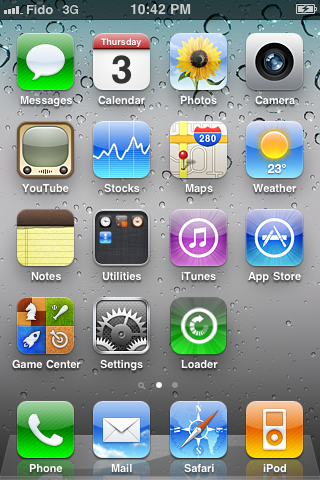
Step Ten
Press to select Cydia then press the large Install Cydia button that appears.


Step Eleven
Once Cydia has installed successfully you can remove Loader by pressing the Options button then the large red Remove Loader.app button.


Step Twelve
Restart your iPhone then run Cydia. Let it do all the necessary updates then follow our Unlock tutorial if possible for your device.

7:34 AM 0
Jailbreak 4.2.1 Greenpois0n RC5 [Mac] [Updated x6][Guide]
A long-awaited update of Greenpois0n which makes the tool compatible with iOS 4.2.1.all users can run untethered jailbreak firmware 4.2.1, even those who bought a device that natively upright version of the firmware. Below we publish our comprehensive guide to run the jailbreak on a Mac

Recall that Greenpois0n RC5, unlike Redsn0w 0.9.7 Jailbreak Monte and technology, do not use the firmware 4.2 beta 3 and save the certificate SHSH for this firmware, so it can be used by all users.
With Greenpois0n users can perform a jailbreak on your device type untethered. This means you will not need to reconnect the device each time you restart the computer to avoid losing your personal data and, consequently, also the jailbreak itself.
Video Help
We have recently created a video walkthrough of Greenpois0n, you can find in this article.
Guide Boot animated logo
Here, however, our guide to enable and disable the boot logo animated Greenpois0n RC5.
Compatible Devices
- iPod Touch 2G (Model MB and MC)
- iPod Touch 3G
- iPod nano 4G
- iPad 1G
- iPhone 3G (new and old iBoot iBoot)
- iPhone 4
- iPhone 4 Verizon (not tested)
- Second generation AppleTV (version RC6 onwards)
- Greepois0n RC5_2 for Mac (download)
- iPhone / iPod touch / iPad updated to iOS 4.2.1 (you can update it from iTunes if you have not installed that version of the operating system).
- Mac OS X 10.5 or later.
1. Greenpois0n RC5 download using the link above.
2. Close iTunes, and once finished downloading Greenpois0n, move the application on your desktop and run it. Then click Jailbreak.

4. If you have performed these steps correctly, your device will now be entered into DFU mode and then ready for the jailbreak.
5. From here on, the whole process will be automatic. The success of the operation will be confirmed directly by Greenpois0n.
Now is the time to work on the iPhone, a few simple steps.
1. You will notice a new icon named Loader, open it.

2. Open the Loader, please click on the item and then click Install Cydia.

3. It will start automatically install Cydia after which you will be asked if you want to delete the Loader from the device. Click on Remove to uninstall the application. Recommend it.
Congratulations! Now your device is unlocked and you have Cydia installed in the Home!
Notes
- If Cydia will not appear at the end of the procedure, try to reboot the terminal and you should see the icon in the Home.
- This type of jailbreak is NOT to be performed by users with iPhone foreigners.
- By performing the jailbreak with Greenpois0n RC5 will automatically apply the boot animation logo of Chronic Dev Team.
However, if you have problems with crashes and Greenpois0n Snow Leopard, you should follow this guide to correct the defect.
UPDATE 1: Due to some problems encountered by users, the Chronic Dev Team has removed the link to download Greenpois0n RC5. Probably, once corrected the bugs found by users, will again be made available the download of what, at this point should be the version of RC6 Greenpois0n .
UPDATE 2: MuscleNerd announced that those who have already run the jailbreak with tethered Redsn0w Greenpois0n RC5 can use to make it untethered. Will therefore not be repaired. For those, however, fails to open its Greenpois0n, Chronic Dev temporary solution is to "hold the Home button until it begins to run code Greenpois0n.
UPDATE 3: Users should not be able to install Cydia through the RC5 Loader Greenpois0n can do so using the latest version of Redsn0w (more info in update 6).

UPDATE 4: Pod2G announced that the next few hours will print a new version of Greenpois0n that will fix the annoying bug that prevents the start of the jailbreak using the current version of the tool.

UPDATE 5: has just been released, unofficially, a new version of RC5 Greenpois0n for Mac OS X that fixes the bugs found during the activation of the jailbreak. You can download it here . Now the jailbreak will be done correctly and also much faster. (It still has to resolve the problem by installing from Cydia Loader, but in this case the fault is to be referred to the server downtime of Chronic Dev Team and Saurik).
UPDATE 6: Install Cydia | Alternative Method.
If you still fail to properly install Cydia, the jailbreak after Greenpois0n with, do not click on the Loader, but downloaded the latest version of Mac RedSn0w available here.
Next, execute Redsn0w and click Browse to select the firmware 4.2.1 downloaded from this link. Go ahead and just select the option "Install Cydia" and, for you have finished, you will have Cydia on your iPhone
2:48 AM 0
Sunday, February 6, 2011
GreenPois0n RC6 will Bring Untethered iOS 4.2.1 Jailbreak for Apple TV
After the release of Greenpois0n RC5 untethered jailbreak on iOS 4.2.1 now for both Mac OS X and Windows, here comes some good news about Apple TV 2G users. iPhone hacker pod2g has confirmed that Greenpois0n RC6 will be available soon to bring untethered jailbreak on iOS 4.2.1 for Apple TV 2G.

lamJam: greenpois0n rc5/5.2 not workingwith AppleTV2 – @pod2g says it will in next build.Besides, Greenpois0n RC5 readme contains supported devices which includes Apple TV 2G support coming in the RC6.
pod2g: @BlamJam sorry but I was talking about RC6.
*** greenpois0n 1.0 RC5 ***In meantime, you can use the Windows and Mac OS X version of Greenpois0n RC5 to untether iOS 4.2.1 jailbreak for all devices mentioned above in the readme. We'll keep you informed whenever the RC6 version is released. Stay tuned
> Description of the software:
greenpois0n will Jailbreak your iDevice.
Supported iDevices:
- - iPod Touch 2G (all bootroms)
- - iPod Touch 3G
- - iPod Touch 4G
- - iPad 1G
- - iPhone 3Gs (all bootroms)
- - iPhone 4
- - iPhone 4 Verizon (_not_tested_)
- - ___AppleTV 2___ (support will be added in RC6)
2:24 AM 0
Monday, January 17, 2011
Jailbreak about die by Federal Government ?!
NBC reports that Apple has asked the federal government to help crack down on hackers and stop them from jailbreaking iPhones.

Current jailbreak technologies now in widespread use utilize unauthorized modifications to the copyrighted bootloader and operating system, resulting in the infringement of the copyrights in those programsThis request came just after Sony's filed lawsuit against PlayStation and iPhone hacker Geohot. This action from Apple came though the Library of Congress having deemed that jailbreaking your iPhone in order to install applications not approved by Apple is totally legal. [NBC, via iClarified]
8:35 AM 0
Wednesday, January 12, 2011
Jailbreak iOS 4.2.1 before iOS 4.3 / 4.2.5 Official Release [ Comex's Untethered Jailbreak Soon]
Jailbreak iOS 4.2.1 before iOS 4.3 / 4.2.5 Official Release that is what Comex said for his Untethered Jailbreak Soon it`s good news, Andrea Cervone over iPhoneItalia was able to contact with Comex (the hacker behind JailbreakMe and Spirit), he asked him whether he will preserve his untethered jailbreak until Verizon releases iPhone 4 which will be powered by iOS 4.2.5 ? Let's see how Comex replied him
Andrea Cervone asking: So, if Apple releases iOS 4.2.5 on 10 February, you’ll preserver your new tool and exploits for that firmware? Maybe this will be a good move. Dev Team and Chronic Dev are releasing their tools for iOS 4.2.1, your can be saved for the future too.So, it's now clear that Comex has moved back about his last ETA (estimate to arrival) for his untethered jailbreak for iOS 4.2.1 as it was related to iOS 4.3 (or iOS 4.2.5) official release. Anyway let's wait and see. Stay tunes
Comex replying:
I hadn’t seen that.
Interesting.. but a month’s
A long time to wait.
2:26 AM 0
Sunday, January 9, 2011
GreenPois0n Jailbreak iOS 4.2.1 [Soon]
Chronic Dev Team member Joshua Hill behind GreenPois0n jailbreak tool has just posted on his Twitter account that he'll bring untethered jailbreak for iOS 4.2.1 by the next GreenPois0n version.
While the iPhone Dev Team is working hard to bring untethered Redsn0w 0.9.7 jailbreak,

p0sixninja: A lot of people are saying another tethered jailbreak is pointless, I agree. Focusing on getting untethered before releaseMore interesting news that this won't require SHHS blobs for 4.2b3 unlike the iPhone Dev Team's Redsn0w 0.9.7, according to a reply for someone asking if it is based on the same exploit Comex working on, and whether or not it will require SHSH blobs for 4.2b3 unlike Redsn0w 0.9.7.
There's no ETA yet but we'll come back with more updates ! [Source: Twitter]
2:38 PM 0
Redsn0w 0.9.7b5 to Fix Bluetooth Issues !
Dev Team has just updated Redsn0w 0.9.7 untethered iOS 4.2.1 jailbreak to fix bluetooth issues and any sand-box related issues will be fixed.

The Windows version is not released yet due to it's slow compared to the Mac OS X version. So the iPhone Dev Team working on speeding it and release it as soon as possible.
The update follows as:
The fifth beta is now available (testers ONLY please!). Bluetooth is now working (and any sandbox-related issues should be resolved too). Please do not pirate the 4.2b3 IPSW! Only those enrolled in the iPhone Developer program have legitimate access to that IPSW using these links (http://pastie.org/1403214) (the links won’t work unless you’re a legit developer currently logged in).To use Redsn0w 0.9.7b5, use our guide posted here while removing STEP 4 since it doesn't required usbmuxd anymore.
There is actually a Windows version of beta5, but it’s excruciatingly slow compared to the Mac version because it’s forced to use files on your hard drive instead of RAM while it’s processing the very large IPSW images. It really is very very painfully slow, so we probably won’t be releasing it for testing purposes unless it can be sped up somehow.
Download iOS 4.2.1 for iPhone 4, 3GS, 3G, iPad, iPod touch
Download Redsn0w 0.9.7b5 for Mac
Download iTunes 10.1.1 for Mac and Windows
2:20 PM 0
Jailbreak PS3 Running 3.55 Firmware [HOW TO]
Two days ago we have showed you a video presenting the jailbreak for PlayStation 3 (PS3), this jailbreak is a shared success between fail0verflow team and Geohot, after that I have been asked a lot about the full step by step guide to jailbreak PS3 using Geohot method.

How To: Jailbreak PS3 on 3.55 only
STEP 1: Plug a USB stick into your computer
STEP 2: Create a folder in the root of the USB stick called PS3
STEP 3: Create a folder inside the PS3 folder called UPDATE
STEP 4: Download [Mirror] or http://geohot.com/jailbreak.zip
STEP 5: Unzip Jailbreak.zip to PS3UPDAT.PUP
STEP 6: Move PS3UPDAT.PUP to the directory UPDATE that you just created on the USB stick
STEP 7: Plug the USB stick into your PS3
STEP 8: Navigate to Settings Tab
STEP 9: Choose System Update
STEP 10: Choose Update via Storage Media
STEP 11: It will say it found Version 3.55-jb
STEP 12: Choose OK
STEP 13: Accept Conditions and Install Update
STEP 14: After less than a minute, your PS3 will update, beep 4 times then shut down.
STEP 15: Power up your PS3 (You will have to do it on the console and not by the controller)
STEP 16: Your PS3 is now jailbroken!
How To: Install Packages
STEP 1: Plug your USB stick into your computer
STEP 2: Drop http://geohot.com/test.pkg into the root of the USB stick [Mirror]
STEP 3: Plug your USB stick into your PS3
STEP 4: Navigate to the Game Tab
STEP 5: Choose Install Package Files
STEP 6: Select the test.pkg
STEP 7: After it installs you will find the test package from geohot installed below the Install Package Files folder
STEP 8: Wait for more packages to be created by the PS3 community
Note: With the above geohot's PS3 jailbreak guide, you won't be able to play backup games or pirated games or whatever you choose to call them. You can install packages with the provided installer. More packages will be coming from the PS3 jailbreak community in the coming weeks and months.
9:27 AM 2
Thursday, January 6, 2011
Download Redsn0w 0.9.6rc8 with some Bug Fixes !
Redsn0w 0.9.6rc7 was released couple of days ago with ‘one-click’ tethered boot option to ease the process for those having a tethered jailbreak until the untethered redsn0w 0.9.7 jailbreak is finalized. Redsn0w 0.9.6rc8 offers a few bug fixes from rc7, most significantly that custom tethered boot logo commands will now report if and why an invalid PNG file is attempted.

Download Redsn0w 0.9.6rc8 for Windows
Download Redsn0w 0.9.6rc8 for Mac OS X
Download iOS 4.2.1 for iPhone, iPad and iPod touch
Download iTunes 10.1 for Windows and Mac OS X
2:11 AM 1
Monday, January 3, 2011
Geohot Releases PS3 Root Keys ! PS 3 is Now Pwned for Life !
Couple of days back, we informed you about a small group of German hackers called fail0verflow who found an exploit dubbed as the PlayStation 3’s “private key”, which is used by Sony itself to restrict the access to unsigned code and block pirated software.

props to fail0verflow for the asymmetric halfNow, this prodigy hacker Geohot has released PS 3 Root Keys publicly on his own site beside thanking the fail0verflow team. He also encouraged them to contact him if they want their “next console to be secure”. From now on, developers can make their own applications, custom firmwares or even pirated ISOs without facing any kind of problems. Well, well, well. What's next geo? [PSX-Scene]
no donate link, just use this info wisely
i do not condone piracy
if you want your next console to be secure, get in touch with me. any of you 3.
it’d be fun to be on the other side.
…and this is a real self, hello world
shouts to the guys who did PSL1GHT
without you, I couldn’t release this
11:03 PM 3
Redsn0w 0.9.6rc7 Released ! Brings One-click Tethered iOS 4.2.1 Boot !
The iPhone Dev Team has just released a new version of Redsn0w with one-click tethered iOS 4.2.1 jailbeak boot support. Redsn0w 0.9.6rc7 includes “one-click tethered boot” support for those of you running the tethered 4.2.1 jailbreak.


Here's the update from the official blog:
We've updated redsn0w to include "one-click" support for those of youPlease note that the iPhone Dev Team is working on untethering iOS 4.2.1 jailbreak so you don't need to connect your iOS device everytime it reboots. They are have released Redsn0w 0.9.7 beta for Mac OS X, you can try the latest release of this beta but you need iOS 4.2 beta 3 hashes and IPSW file.
running the tethered 4.2.1 jailbreak. Using command-line arguments,
you can now bypass the screens you'd normally see as you use redsn0w
to "Just boot tethered for now".
The available command line arguments are:
-j to ask redsn0w to "Just boot now"
-i to specify your reference IPSW
-o for old-bootrom iPod touch 2G and iPhone 3GS
-b to specify your own boot logo png
For example, to get redsn0w for Mac to do a tethered boot of an iPod touch 4G jailbroken at 4.2.1:
open ~/Desktop/redsn0w.app --args -j -i ~/Desktop/iPod4,1_4.2.1_8C148_Restore.ipsw
This assumes both redsn0w and the IPSW are on your OS X desktop, so
modify as necessary! Included in the zip is an example script file
that you can double click on to launch redsn0w like this (the Windows
example assumes everything is in C:\). (Mac users: please remember to
change the permissions of your custom *.command files to allow
execution.)
This should help ease the pain of the tethered jailbreak until @comex
comes up with a 4.2.1 untether (or for those of you with legit access
to the 4.2b3 IPSW, until the "Jailbreak Monte" untether is out of
beta)!
- PLEASE UPGRADE TO iTunes 10.1 FOR BEST RESULTS
- WINDOWS 7 USERS SHOULD RUN redsn0w IN "XP COMPATIBILITY" MODE
- Make sure you're using a USB 2.0 port
Download Redsn0w 0.9.6rc7 for Windows
Download Redsn0w 0.9.6rc7 for Mac OS X
Download iOS 4.2.1 for iPhone, iPad and iPod touch
1:28 AM 3
Sunday, January 2, 2011
Greenpois0n RC5 to Jailbreak iOS 4.2.1 Soon
Apparently, we are close from the release of a new version of Greenpois0n to support iOS 4.2.1 jailbreak on iPhone 4, 3GS, iPod touch 4G, 3G and iPad. Joshua Hill, the hacker behind Greenpois0n jailbreak (Chronic dev-team) has confirmed this on his twitter.

iPhoneHelpr asking: I think the available latest build from the GP site is rc3_3Unfortunately, Greenpois0n RC5 will be tethered jailbreak for a while due to lack of time, Greenpois0n was scheduled to be release by the new year day but some more kernel patches in sandbox have to be applied, therefore, it has been delayed from its first targeted timeline.
p0sixninja (Joshua Hill) replying: yea, at this point in time rc5 is right around the corner so we're just pressing ahead to get it out asap

rockybsr08 asking: I should clarify. Is it untethered on all devices?In the above quoted text sections, it is expected to see the tethered Greenpois0n within few days then it will be followed the untethered one when they got the enough time for that. Stay tuned.
p0sixninja (Joshua Hill) replying: no, i've been too busy working on updating it I haven't had much time to work on exploits. I'm only human!
8:53 AM 2
Friday, December 31, 2010
Rubyra1n Jailbreak by Geohot [Soon]
New Jailbreak @Rubyra1n_JB on Twitter for Geohot's next jailbreak for iPhone, iPad and iPod touch may be called Rubyra1n. The domain Rubyra1n.com or RubyRa1nJailbreak.com is registered by the popular iPhone hacker George Hotz. That was on 27th March 2010. This jailbreak might bring untethered hacks for iOS 4.2.1 which is currently still tethered on new-generation devices.

And as noted by Redmond Pie, the whois records for both blackra1n and rubyra1n are the same while the whois for limeran is different. Geohot may has changed the records when limera1n was known to public to hide this new tool behind the scenes. What's also interesting that Geohot has registered both limera1n.com and rubyra1n.com at the same date (27th March 2010). There's no further confirmation but we'll keep you updated. Check the whois records for Geohot's sites below.
Whois record for Rubyra1n.com or RubyRa1nJailbreak.com.
Registrant:Whois record for Limera1n.com.
(none)
183 Boulevard
Glen Rock, New Jersey 07452
United States
Registered through: GoDaddy.com, Inc. (http://www.godaddy.com)
Domain Name: RUBYRA1N.COM
Created on: 27-Mar-10
Expires on: 27-Mar-12
Last Updated on: 27-Mar-10
Administrative Contact:
Hotz, George geohot@gmail.com
(none)
183 Boulevard
Glen Rock, New Jersey 07452
United States
2016583760
Technical Contact:
Hotz, George geohot@gmail.com
(none)
183 Boulevard
Glen Rock, New Jersey 07452
United States
2016583760
Domain servers in listed order:
NS07.DOMAINCONTROL.COM
NS08.DOMAINCONTROL.COM
Registrant:Whois record for Blackra1n.com.
(none)
123 Fake St
Land of the Lost, Idaho 11111
United States
Registered through: GoDaddy.com, Inc. (http://www.godaddy.com)
Domain Name: LIMERA1N.COM
Created on: 27-Mar-10
Expires on: 27-Mar-12
Last Updated on: 13-Apr-10
Administrative Contact:
Hotz, George george@landofthelost.com
(none)
123 Fake St
Land of the Lost, Idaho 11111
United States
+1.6502651210
Technical Contact:
Hotz, George george@landofthelost.com
(none)
123 Fake St
Land of the Lost, Idaho 11111
United States
+1.6502651210
Domain servers in listed order:
NS1.HOSTMONSTER.COM
NS2.HOSTMONSTER.COM
Registrant:
(none)
183 Boulevard
Glen Rock, New Jersey 07452
United States
Registered through: GoDaddy.com, Inc. (http://www.godaddy.com)
Domain Name: BLACKRA1N.COM
Created on: 05-Oct-09
Expires on: 05-Oct-11
Last Updated on: 06-Oct-09
Administrative Contact:
Hotz, George geohot@gmail.com
(none)
183 Boulevard
Glen Rock, New Jersey 07452
United States
+1.6502651210
Technical Contact:
Hotz, George geohot@gmail.com
(none)
183 Boulevard
Glen Rock, New Jersey 07452
United States
+1.6502651210
Domain servers in listed order:
NS1.HOSTMONSTER.COM
2:53 PM 3
Redsn0w 0.9.7b4 to Untethered Jailbreak Without the Need of ‘usbmuxd’ Process
iPhone Dev-Team has just released Redsn0w 0.9.7 beta 4 with a major change as the reds0w no longer requires you to install and run a separate program for the usbmux which caused a lot of confusion with the jailbreak process.

Starting with this version, redsn0w no longer requires you to install and run a separate program for the usbmux (this was a non-trivial procedure for many). It’s okay to keep that program running if you normally use it for ssh anyway. We also think we’ve fixed a race condition in the GUI that was causing redsn0w to crash during the “Preparing JB Monte Files” step. Nothing at all has changed on the iPhone side (where the main issues are still just Bluetooth and Skype).As the Dev-Team mentioned in the above quotation, so far, this version is still causing problems with Bluetooth and Skype. Now you have to follow our full step by step guide (Skip step 4) to untethered jailbreak your iPhone 4, iPod touch 4G and iPad.
Download Redsn0w 0.9.7b4 for Mac
Download iOS 4.2.1 for iPhone 4, 3GS, 3G, iPad, iPod touch
Download iTunes 10.1.1 for Mac
12:55 AM 5
Wednesday, December 29, 2010
Ra1nb0wra1n.com: have a new tool for the jailbreak?
It was recently discovered a new website that might suggest the arrival of a new tool for Jailbreak: ra1nb0wra1n.com.

The figures are those of the famous hacker GeoHot, that have "invented the jailbreak and unlock tool developed as blackra1n and limera1n.Domain Name: RA1NB0WRA1N.COM
Created on: 26-Apr-10
Expires on: 26-Apr-11
Last Updated on: 26-Apr-10
Administrative Contact:
George Hotz geohot@gmail.com
183 Boulevard
Glen Rock, New Jersey 07452
United States
+1.2016583760 Fax -
Technical Contact:
George Hotz geohot@gmail.com
183 Boulevard
Glen Rock, New Jersey 07452
United States
+1.2016583760 Fax -
Obviously we do not know anything for sure, but the name might suggest the arrival of a new tool for the Jailbreak by GeoHot via :iSpazio
8:51 AM 1
Monday, December 27, 2010
Redsn0w 0.9.7b4 Windows Within Few Days
Just a quick heads up! Redsn0w 0.9.7 beta was out yesterday to bring untethered jailbreak for iOS 4.2.1 but some of our readers has reported that usbmuxd process is not working with them. Also Windows users were left behind and couldn't convert their devices to untethered jailbreak.
Though, the iPhone Dev Team is working hard on releasing new betas so in a new tweet today confirming that Redsn0w 0.9.7b4 will incorporates usbmuxd so you shouldn't worry anymore. In the same tweet, the iPhone Dev Team has confirmed that after finishing this task, the next version (Redsn0w 0.9.7b5) will include the Windows version.

tman15555: @redsn0w_testers when will the version that incorporates usbmuxd be realeased? I keep on getting stuck on installing bundlesThis indicates that we may very soon see the public release of Redsn0w 0.9.7. More updates as they come ! Stay tuned !
redsn0w_testers: @tman15555 that version is next...and if that's successful, we should be able to expand to Windows testers after that
11:27 PM 2
Redsn0w 0.9.7b3 ! Fixing All App Problems
The iPhone Dev Team has just released the third beta version of Redsn0w 0.9.7 to convert tethered jailbreak of iOS 4.2.1 to untethered on iPhone 4, 3GS, iPod touch 4G and iPad. The third beta is still for testing only so stay away if you rely on your device or care for an unlock.

Redsn0w 0.9.7b3: This version extends the fix made in beta2 over to the non-GUI programs too (like the daemons that handle media content). So now embedded videos in iTunes work. Just follow the guide posted here to achieve the untethered jailbreak for iOS 4.2.1.
Download Redsn0w 0.9.7b3 for Mac OS X
Download iOS 4.2.1 for iPhone, iPad and iPod touch
Download iTunes 10.1.1 for Windows / Mac OS X
7:39 AM 0
Sn0wbreeze 2.2 to Offer Baseband Preservation Mode
iH8snow, the developer behind Sn0wbreeze, iREB, and f0recast has just announced that he is working on a new version of Sn0wbreeze that will offer baseband preservation mode. This feature was first implemented in TinyUmbrella which allows preserving iPhone 4 only baseband while upgrading to iOS 4.1 but this tool stopped couldn't preserve the baseband while upgrading to iOS 4.2.1.
Now with the new version of Sn0wbreeze by iH8sn0w, you may be able to preserve iPhone 4 / 3G / 3G while upgrading to iOS 4.2.1. Below is the first screenshot of the new version:

On the other hand, Redsn0w 0.9.7b3 was released few hours ago to fix all native app crashes and bring untethered jailbreak for iOS 4.2.1.
4:10 AM 1


